AI HIGHLIGHTS FOR CUE SPORTS

Every shot.
Worth watching.

Turn your pool recordings into highlights. Keep the action, cut the waiting, and see your game differently.

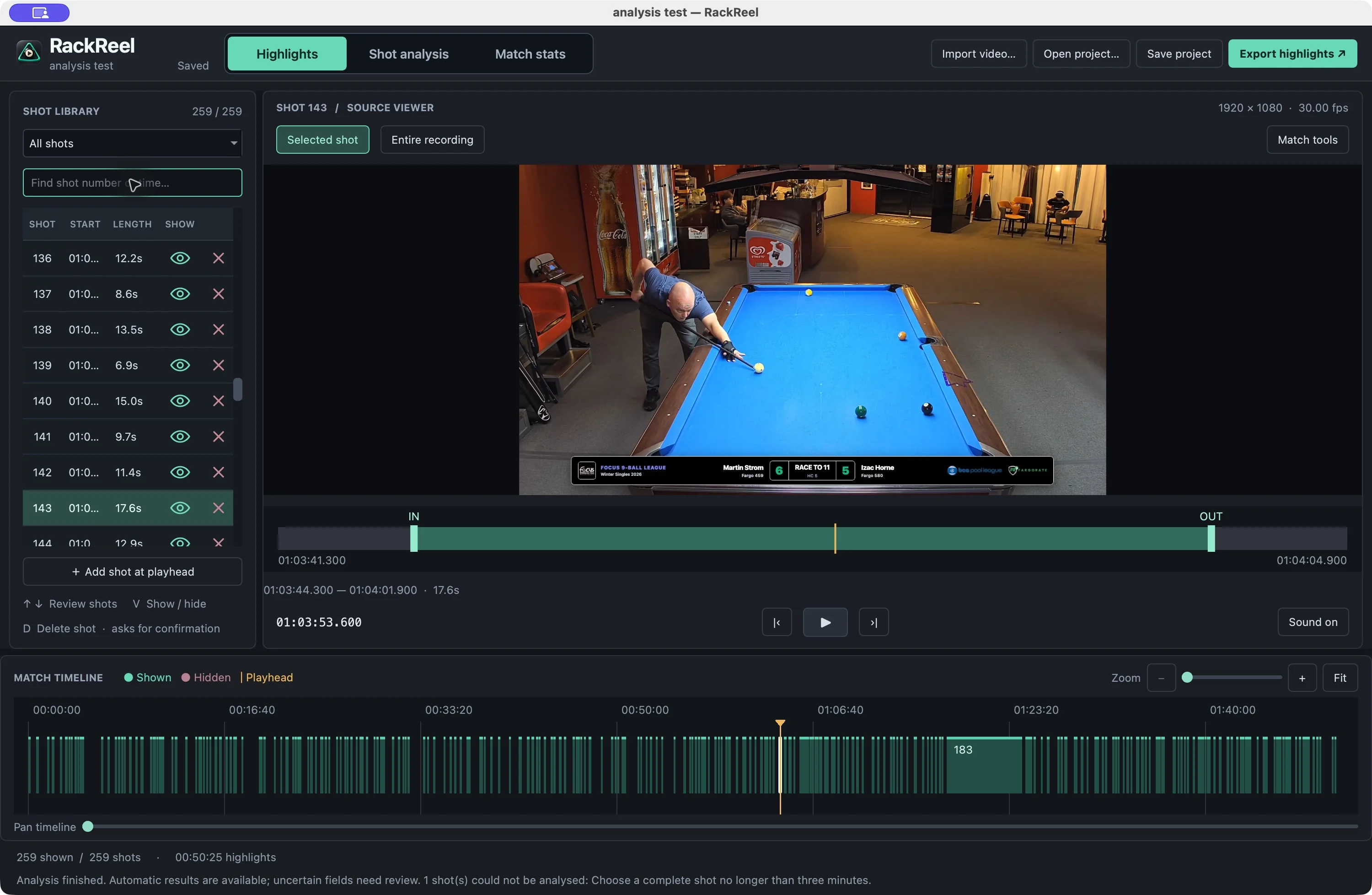
The real RackReel highlights editor with Martin down on shot 143, with the selected shot and match timeline.
The action, all together. Choose your shots. Refine your cuts. Make your reel.

Made for your game.
Kept on your computer.

Mac & WindowsStart freeNo video uploads

FROM FULL MATCH TO FINAL CUT

Less waiting.
More worth watching.

RackReel finds the shots. You decide what makes the reel.

The full recording

The shots you want, with the waiting in between.

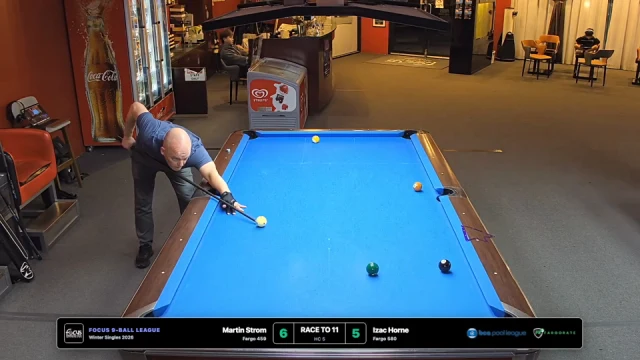
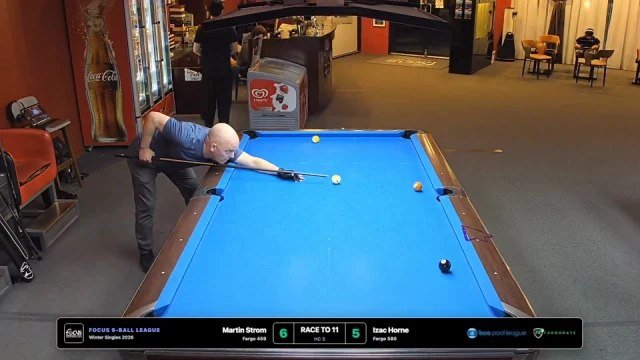
Martin down on shot 143 on a blue nine-ball table.
Shot 143 ↗17.6s
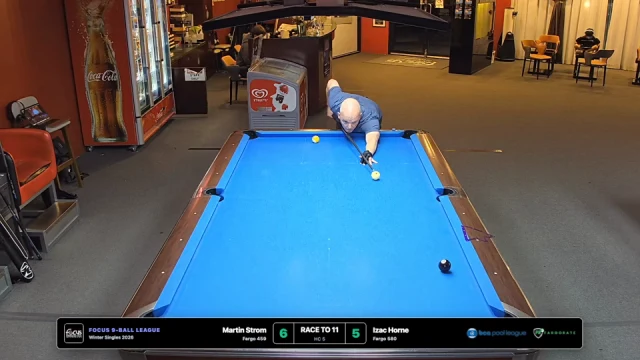
Martin down on shot 144 in the same nine-ball match.
Shot 14412.9s
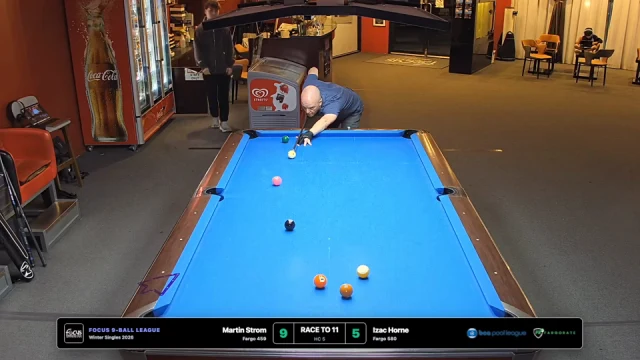
Martin down on shot 145.
Shot 14517.6s
Martin down on shot 208 from the match recording.
Shot 20810.3s

Open a video.

Choose a recording in the RackReel desktop app. Your video stays on your computer.

Make it your reel.

AI identifies the shots. Review the selection and fine-tune the boundaries.

Fine-tune and publish.

Export your selected action as one video, with your choice of transitions and quality.

Detection is a starting point. Moving cameras and cutaways can need extra review.

Replay the shot.
Read the table.

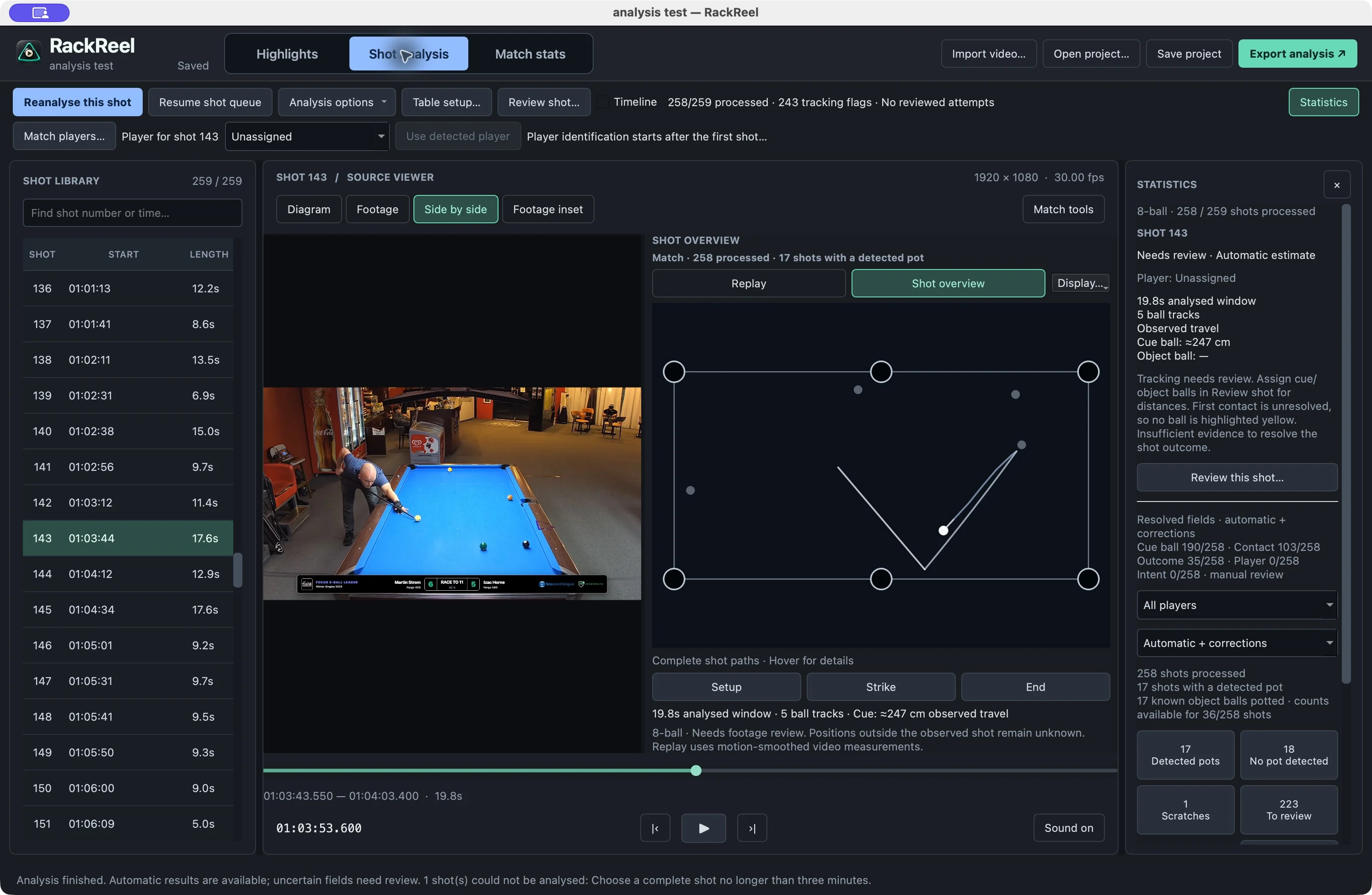
Put the original footage beside the whole-shot overview. Follow the paths, inspect the contact, and return to the moment.

Two views. One shot.
Switch between footage, diagram and synchronised replay.

Room for your judgement.
Review uncertain tracking and correct the details.

Explore shot analysis
Real shot 143 overview showing the original footage beside the reconstructed cue-ball path.
Actual analysis workspace. Fixed-camera analysis can need corrections.

A match ends.
The insight stays.

Keep a local match history. Review available results, compare sessions, and give every number its context.

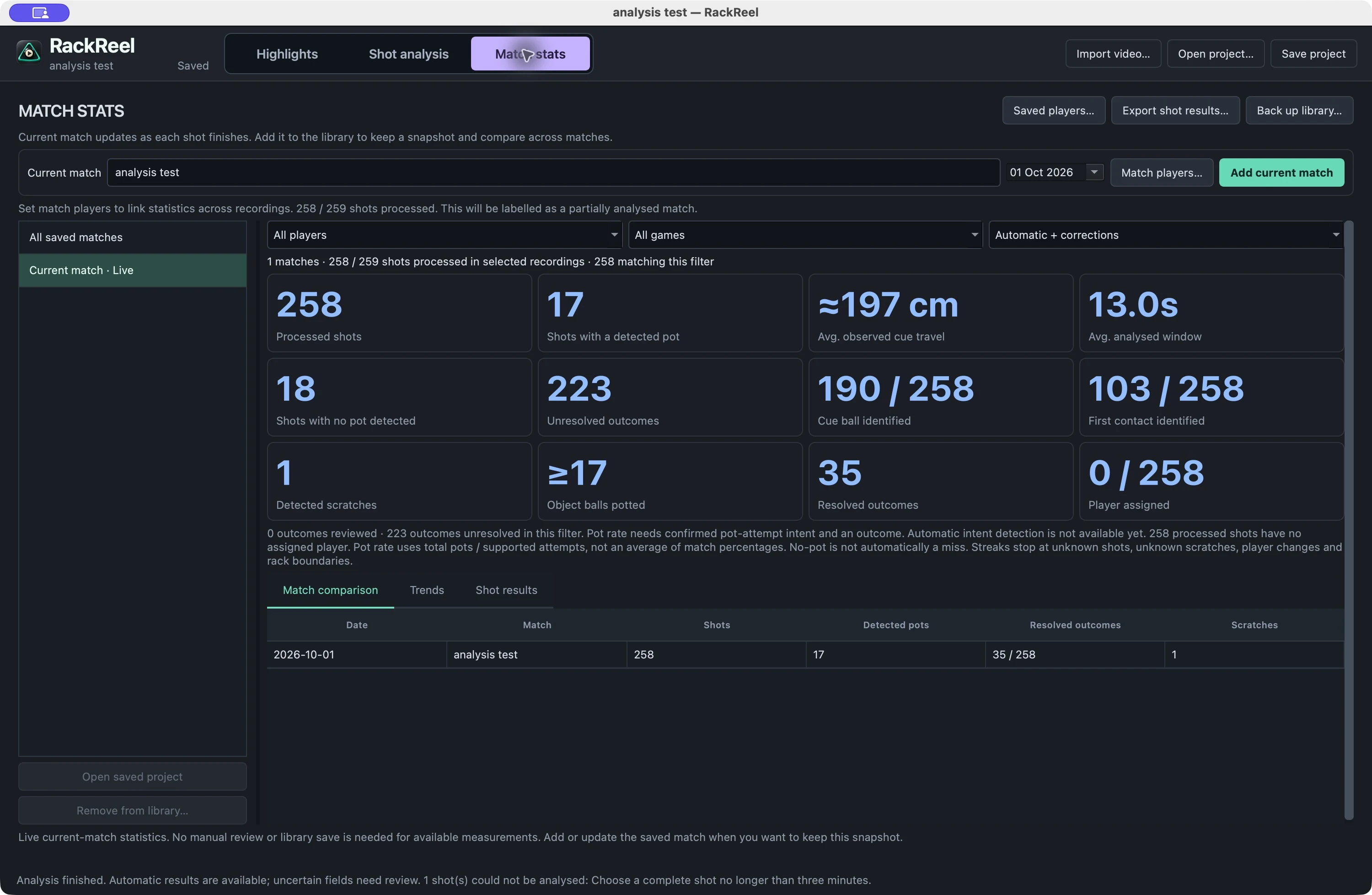
Actual RackReel match statistics with processed shots, observed travel, detected pots and unresolved outcomes.
Real match data, including what still needs review. Pot rate requires confirmed pot-attempt intent and outcomes.

Your matches, together. Save sessions and filter results by player, game and review status.

Evidence behind the numbers. See analysis coverage and unresolved outcomes alongside the results.

Ready to revisit. Return to a saved project or export filtered shot results.

Your footage.
Your computer.

Your videos stay on your computer. Detection, editing, analysis and video export run locally.

Your account takes care of subscriptions and licences.

How we handle your data

A closer look at the tools.

Explore the details, from your first cut to your next match.

Highlights, shot analysis and match statistics are included in RackReel 0.5.2. Analysis is designed for fixed-camera and overhead recordings.

Automatic match highlightsTurn a full recording into a reel of the action.
  • Automatic shot detection. Find shots in your recording and build an editable shot library without setting every cut by hand.
  • Keep the shot, cut the wait. Detection looks for cueing before the strike and ball movement afterwards to suggest clip boundaries.
  • Your choice of highlights. Show or hide individual shots to choose exactly what goes into your reel. Hidden shots stay available for review.
  • Cutaway control. Review omitted sections within a shot, adjust their boundaries or restore the footage. Playback and export follow your choices.
  • One finished video. Combine your selected action into a continuous highlights reel, with overlapping source ranges merged automatically.
  • Original footage preserved. Cuts and selections are saved in your project; your source video stays untouched.
Shot diagrams & synchronised replaysSee ball paths alongside the original footage.
  • Animated table replay. Follow reconstructed ball movement at the same timestamp as your video, with fading trails behind the balls.
  • Whole-shot overview. Switch to complete ball paths to study the shot without losing your playback position.
  • Four viewing layouts. Choose Diagram, Footage, Side by side or Footage inset; expand the inset when you want a closer look.
  • Adjustable diagrams. Show or hide paths and annotations, filter the current path segment and match the table orientation to the camera.
  • Shot measurements. Inspect observed cue-ball and first-contacted-ball travel where those roles can be resolved, plus timing and track details.
  • Shareable analysis. Export shot diagrams as PDF, SVG or PNG, and analysis data as CSV or JSON.
  • Optional physics fitting. Explore an experimental physics-based replay model in addition to the default replay based on smoothed video observations.

For calibrated fixed-camera and stationary overhead footage. Tracking and reconstruction are experimental; hidden balls, breaks and missing footage can leave paths incomplete or uncertain.

Player statistics & match historyReview a match or follow your results across saved sessions.
  • Live match statistics. See available results as shots finish analysing, with processed-shot and review coverage.
  • Remembered players. Choose Me, reuse saved names or add participants for solo practice and multiplayer matches.
  • Results by player. Filter by player, game and review status. Inspect pots, misses, safeties, known scratches and object balls pocketed where recorded.
  • Pot rate and streaks. Compare success rates for known pot attempts and supported consecutive-pot streaks, with sample counts to give the numbers context.
  • Local match library. Save named, dated match snapshots, then view one match or all saved matches. Updating a recording replaces its entry without double-counting it.
  • Match comparisons and trends. Compare sessions in a table and trend chart, using the same player, game and evidence filters throughout.
  • Review away from the footage. Browse saved statistics even when the original video is offline; reopen the linked project when it is available.
  • Export and back up. Export filtered shot results to CSV and back up your match library with its saved player names.

Pot rate requires known pot-attempt intent; an unknown shot is not counted as a miss. Streaks are not verified rack run-outs. Statistics depend on the available analysis and your corrections.

Precise editing & playbackFine-tune every cut with the footage in front of you.
  • Searchable shot library. Find shots by number or time, filter shown and hidden clips, and jump straight to a shot.
  • Frame-by-frame review. Play, pause, seek, step through individual frames and toggle audio.
  • Flexible trimming. Drag clip edges, enter exact in/out times, nudge boundaries by 0.1 seconds or set them at the playhead.
  • Context around each shot. Scrub the surrounding footage in the trim strip or switch between selected-shot and entire-recording playback.
  • Interactive match timeline. See shown and hidden clips in source time, click to select, and zoom, pan or fit the full recording.
  • Add, delete and undo. Add missed shots, remove unwanted clips and undo or redo edits, including trims and visibility changes.
  • Keyboard controls. Navigate shots, play or pause, mark in/out points, toggle visibility and save with shortcuts.
  • Adjustable workspace. Resize panels and show or hide Match tools to suit your screen.
Video export & finishingChoose the format, size and transitions for your reel.
  • Picture and sound crossfades. Set the transition overlap or choose hard cuts. Very short clips use shorter transitions automatically.
  • Three video formats. Export MP4, MOV or MKV with H.264 video and AAC audio.
  • Quality and resolution choices. Choose Compact, Balanced or High quality at source, 1080p or 720p resolution.
  • Size guidance. See an estimated output-size range before exporting and choose where to save the finished video.
  • Free and paid export options. Free exports are watermarked and up to one minute. Plus removes the length limit; Pro also removes the watermark.

Crossfades appear in the exported video. The editor previews the source footage. See plans and pricing for export options.

Reviewable shot analysisAutomatic suggestions, with your corrections kept in control.
  • Background processing. Analyse fixed-camera shots after detection, including shots hidden from your highlights. Cancel and resume analysis as needed.
  • Ball and event suggestions. Review suggested cue-ball roles, first contact, pocket events and scratches where the footage provides enough evidence.
  • Player suggestions. Use experimental shooter suggestions, assign a player to an individual shot and manage the match participants.
  • Manual review and notes. Correct ball roles, outcomes, shot intent and scratch status, and keep personal notes with a shot.
  • Evidence details. Inspect timing, observations and uncertainty, and jump to first contact when it has been identified.
  • Two statistics views. Choose Automatic + corrections for available results or Reviewed only for shots you have checked.
  • Reanalysis without losing your review. Reanalyse a shot or the match while retaining personal notes and explicit corrections; unresolved matches stay flagged for review.

Automatic shot-intent classification and game-specific scoring are not provided. Player identification and ball events can need correction; broadcast footage is excluded from shot analysis.

Recording & table setupSet up detection for the way your match was filmed.
  • Four recording presets. Choose Fixed camera, Overhead, Mixed shots or Full production.
  • Table outline setup. Scrub to a clear frame and confirm an automatic cloth outline or mark it manually for stationary recordings.
  • Detection controls. Choose the analysis time range and sensitivity before starting; reopen setup when you need to adjust it.
  • Broadcast detection options. Experimental moving-camera modes reacquire the table as views change, with an optional local ML cutaway detector.
  • Measured table calibration. Enter playing-surface dimensions in centimetres or inches and confirm table orientation for shot analysis, or defer dimensions and make highlights first.
  • Game labels. Organise recordings as 8-ball, 9-ball, 10-ball, straight pool, banks pool, snooker or one-pocket.

Mixed shots and Full production are experimental and can need extra review. Choosing a game records its discipline; it does not enable automatic scoring or rules enforcement.

Saved projects & local privacyKeep your footage and your work on your own computer.
  • Local video processing. Detection, editing, analysis and video export run on your computer, without uploading the match.
  • Save and return. Save edits, table settings and shot selections, use Save As for another version, and reopen recent projects without rerunning detection.
  • Move your media. Locate the original video again if it has moved. Projects reference your footage rather than embedding it.
  • Unsaved-change prompts. Get a chance to save before closing a project or opening another one.
  • Compact analysis projects. Save completed analysis, player context, notes and corrections in compressed .rackreel files. Existing JSON projects can still be opened.
  • Local player history. Names, match statistics and library backups stay on your computer.
Desktop app, accounts & supportMac and Windows downloads, with flexible paid access.
  • Mac and Windows. Download the desktop app for Apple Silicon Macs or 64-bit Windows computers.
  • Start free. Try the desktop highlights tools and short watermarked exports without a paid subscription.
  • Account and subscription management. Sign in with Google or email, choose monthly or yearly billing, and manage your plan and invoices online.
  • Two-computer activation. Use a paid plan on up to two computers, with up to seven days of offline access within your paid period.
  • Update checks. Check manually for a newer stable release or enable background checks, then choose when to download and install it.
  • Playback preferences. Remember your mute setting and choose whether selecting a shot starts playback.
  • AV1 playback compatibility. Prepare a reusable local playback copy for AV1 recordings while keeping the original video for analysis and final export.
  • In-app feedback. Review and send a support message from the app, with optional recording details or a video link you choose to share.

Start small. Reel bigger.

Same editing workflow. Pick your export length and watermark options.

Billing interval

FREE

Find your best shots.

$0 / forever

No subscription needed.

  • Exports up to 1 minute
  • RackReel watermark
  • Shot detection and editing
  • Local video processing
Get the free app

PLUS

The whole match.

$9.99 / month

$9.99 billed monthly.

  • Unlimited export length
  • RackReel watermark
  • Everything in Free
  • Activate on 2 computers
  • Up to 7 days offline*
Choose Plus

All prices in USD, including applicable taxes. Annual plans are charged in full once a year. Paid plans renew automatically until cancelled. Create an account before purchasing. *Offline access never extends beyond your paid period. Subscription terms.

Your next reel starts here.

Start free. Make highlights, replay your shots and track your match statistics.

A few things to know.

Does my video get uploaded?

No. Detection, editing and export happen on your computer. If you send support a video link, that's your choice. See the Privacy Policy.

Will it work with broadcast footage?

You can choose a recording type for detection, including full productions. Cuts, camera changes and occlusions can make detection harder. Review the shots and adjust the result before exporting.

Can I cancel my subscription?

Yes. Cancel renewal through your account's billing management. Your paid features remain available until the paid period ends, then Free export limits apply.

Do I need an account to try it?

The free desktop features do not require a paid account. Create an account before subscribing so you can manage your licence and connect your computers.